Colorsets#
These are various sets of colors that can be used for lines, markers, qualitative maps, etc. Below is succinctly described how they are used and when to use each of them.
All colorsets are given as named tuples. You can then access the colors by index or by name:
>>> cset = tc.bright
>>> cset.blue
'#4477AA'
Each colorset is available as a module attribute: tc.bright for instance.
All colorsets are also stored in the dictionary tol_colors.colorsets.
This is a special mapping that will accepts both hyphen and underscore versions
(tc.colorsets["high-contrast"] and tc.colorsets["high_contrast"] will
both work).
Except for the high and medium-constrast colorsets that can be sorted by luminance, the colors can be used in any order. In this package, they are given in the order suggested by the technical notes.
Sets#
Design considerations
Red-blind and green-blind vision were simulated by the method described in Section 5 of the technical notes.
The distance between colors was computed by using the CIEDE2000 color difference \(\Delta E_{00}\)
Colors with the same product of saturation S and value V in the HSV color system (same ‘vividness’) were considered to match well together.
“Print-friendly” colors were chosen from the intersection between the sRGB color-space and a generic CMYK color-space that should work with most printers.
To reduce the number of calculations, only websmart colors were considered, meaning the hexadecimal RGB coordinates are only 00, 11, …, FF.
Bright#
The default colorset of this package. Main scheme for lines and labels.

Vibrant#
An alternative to bright, equally colorblind-safe. It is designed for the data visualization framework TensorBoard, built around its signature orange (tweaked to be print-friendly).

Muted#
Another alternative to bright, equally colorblind-safe. It has more colors, but lacks a clear red or medium blue. Pale grey is meant for bad data in maps.

High-contrast#
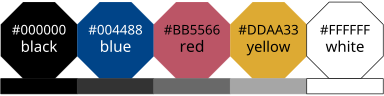
A colorset optimized for contrast. The rectangles underneath colors are shades of grey with the same luminance L*. This set works great for people with monochrome vision, and in a monochrome printout.
Medium-contrast#
An alternative to high-contrast, also colorblind-safe and designed for situations needing color pairs. It is also optimized for contrast and to work in a monochrome printout, but the differences are inevitably smaller.

Pale#
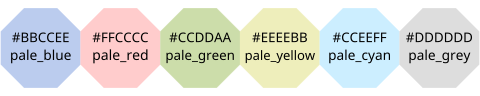
The colors of this set are not very distinct in either normal or colorblind vision; they are not meant for lines or maps, but for highlighting text. Use the pale colors for the background of black text, for example to highlight cells in a table. The text remains readable.
Dark#
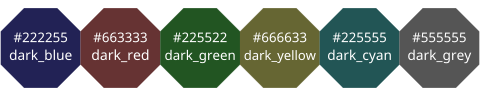
The colors of this set are not very distinct in either normal or colorblind vision; they are not meant for lines or maps, but for marking text. Use the dark colors for text on a white background. The text remains readable.
Light#
An alternative to the pale colorset, designed to fill labeled cells with more and lighter colors than bright, and with more distinct colors than pale, while keeping black text readable. As the colors are reasonably distinct in normal and colorblind vision, it can also be used for general qualitative data.

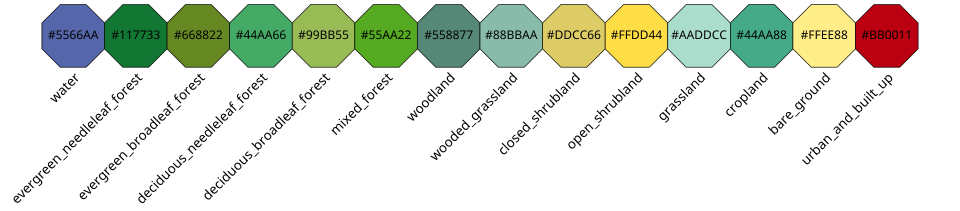
Land-cover#
A specialized colorset for the global land classification of AVHRR data. An alternative to the recommended scheme given by the Department of Geography at the University of Maryland, with more subtle colors, distinct in all visions.
Matplotlib default colors#
This package provides a function to easily set the default colors used by Matplotlib to those from one of the colorsets.
- tol_colors.set_default_colors(cset: str = 'bright', fname: str | None = None, dry: bool = False)
Modify matplotlibrc to set default colors to those of one of the colorsets.
This will modify the colors used autmotically by matplotlib. This function will add a new line in a matplotlibrc file or stylesheet for the property “axes.prop_cycle”. If a line setting a color cycler already exist in the file, it will be overwritten.
This function can run without modifying the file and simply show the line to add by setting the dry parameter to True.
- Parameters:
cset – Name of the colorset to set as new default. Default is “bright”.
fname –
Name of the file to modify. It can be a matplotlibrc or stylesheet file (see the matplotlib documentation on Customizing Matplotlib). If left to None, it will default to:
$MPLCONFIGDIRif set, elseOn Unix/Linux:
$XDG_CONFIG_HOME/matplotlib/matplotlibrcif set, else$HOME/.config/matplotlib/matplotlibrcOn other platforms
$HOME/.matplotlib/matplotlibrc
It will create the file and leading directories if necessary.
dry – If set to True, the function will only print the new configuration line to stdout and will not modify any file. You can then copy-paste the line manually.
CVD Simulations#
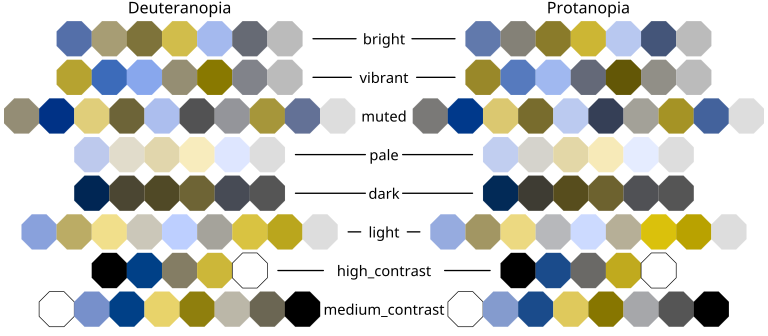
Below are simulations of all the colorsets for total deuteranomaly and protanomaly. Note that it was simulated using a different method than that of the technical notes. Here we relied on the colorspacious package, using the model from Machado, Oliveira and Fernandes (DOI: 10.1109/TVCG.2009.113).